When sales dip, content feels like the suspect
Last month’s numbers land with that familiar thud: orders down, ad spend unchanged, cash tighter than planned. The first instinct is to blame the site copy because it’s visible, editable, and doesn’t require a new channel or a bigger budget. Meanwhile, the real mess is that everything moved at once—traffic mix, pricing, seasonality, inventory, even a small checkout change—and the team still needs an answer fast enough to protect next payroll.
Content becomes the default suspect because it’s the only lever that feels controllable. But rewriting is not neutral: it costs time, risks SEO volatility, and can distract from a simpler fix like a broken promo, out-of-stock best sellers, or a shipping threshold that quietly changed behavior.
The first job isn’t to “improve content.” It’s to decide whether content is a likely revenue driver or just the easiest place to point anxiety, before you spend weeks editing pages that weren’t the problem.
Separate a content problem from a traffic problem
Before anyone touches a headline, pull two lines of evidence from the same time window: sessions and revenue per session (or conversion rate, if that’s what you can reliably track). A traffic problem is boring but clear—overall visits drop, or the mix shifts toward colder sources (more top-of-funnel social, fewer branded searches), and revenue per session stays roughly flat. In that case, rewriting product pages won’t replace missing demand, and the cheapest “audit” is figuring out what channel changed and why.
A content problem shows up when traffic is stable (or even up) but revenue per session slides, especially on pages that used to carry the month. That’s when you inspect page-level conversion and bounce/exit patterns, not blog word count. If a few key URLs lost conversion after a template edit, a new return policy block, or a pricing/shipping change, content isn’t the scapegoat—it’s the surface where the friction became visible.
Watch for customer friction in key pages
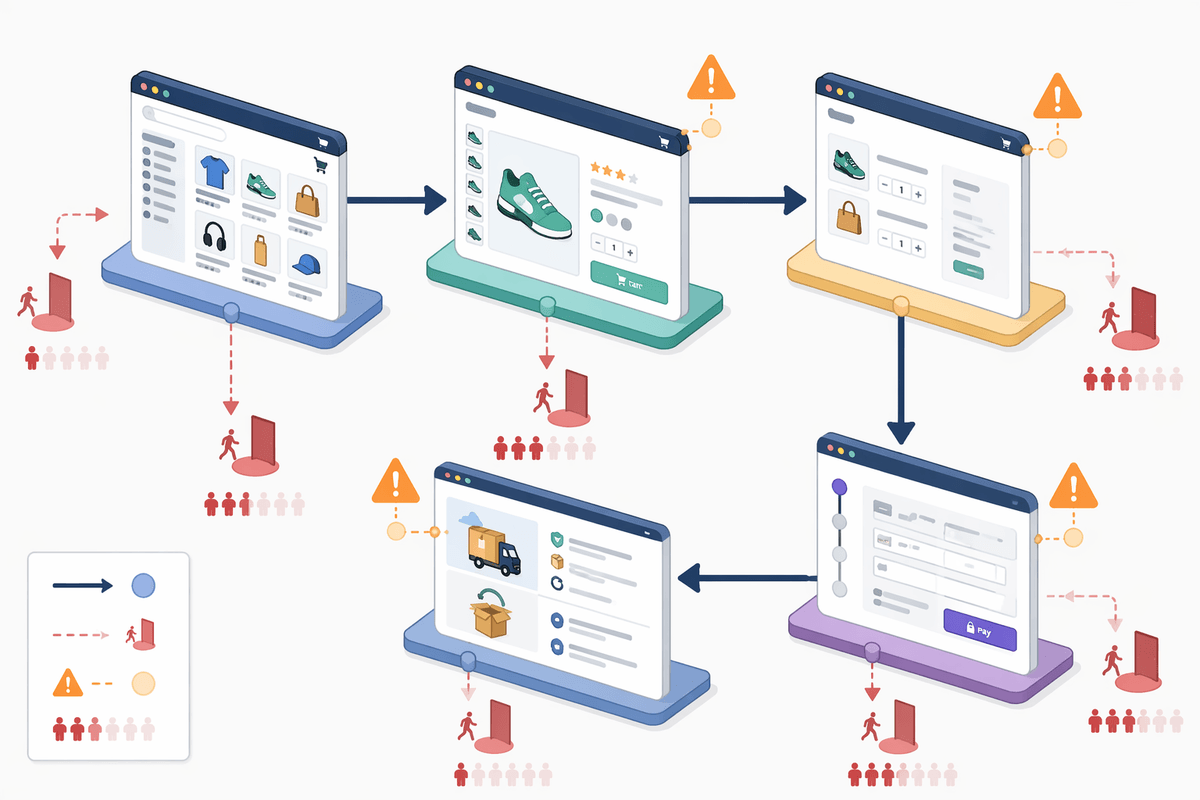
Once page-level conversion is the clue, the next move is to look for “micro-friction” on the URLs that pay the bills: top category pages, best-seller PDPs, cart, and shipping/returns. With a lean team, you can’t inspect everything, so start with the pages responsible for most revenue or most paid-traffic landings and treat each one like a cost center that must earn its clicks.
Patterns usually show up fast: high exits on shipping info, repeated toggling between variants, add-to-cart strong but checkout completion weak, or onsite search terms like “return,” “size chart,” “ingredients,” “warranty.” Pair analytics with two cheap inputs—support tickets and a handful of session recordings—and you’ll see whether copy is missing critical details or whether a policy block, trust badge change, or delivery estimate is quietly scaring people off.
Decide what kind of audit you can afford
By this point it’s usually obvious whether you need a sweeping “content audit” or a smaller diagnostic pass. The constraint is rarely ambition; it’s how long the store can tolerate distraction while orders are already soft. If revenue per session is sliding on a handful of money pages, a light audit can be a spreadsheet of your top 20 URLs with three checks: what people ask support about, what onsite search keeps repeating, and where exits spike. That’s a day or two, and it tells you what to fix without reopening the whole site.
A full audit only earns its price when the problems are structural: duplicated categories fighting each other, thin PDPs across a whole line, outdated policies causing returns, or brand claims that drifted and now invite skepticism. That’s weeks, often with tools, and the real cost is opportunity—paused campaigns, delayed launches, and the risk of changing too much at once.
So scope it like a budget decision, not a creative project: choose a “triage audit” (fast, revenue pages only), a “risk audit” (policies, claims, compliance-sensitive copy), or a “full inventory audit” (everything indexed). If you can’t name the loss you’re trying to stop, you can’t justify the audit you’re about to buy.
A reasonable shortcut that can backfire badly

With a lean team, the tempting move is to “just refresh the top pages” using the fastest shortcut available: copy a competitor’s structure, run the old copy through an AI rewrite, swap a few adjectives, and call it an audit. It feels disciplined because it produces lots of new text quickly, and it avoids paying for a deep crawl or a specialist. The constraint is time—someone wants changes live this week, not after a month of analysis.
The backfire shows up in two places. First, rankings wobble because internal anchors, headings, and on-page intent drift just enough to confuse what the page is supposed to rank for; cannibalization is easy to create and hard to spot without measurement. Second, support and returns creep up because “clean” rewritten copy often strips out the unglamorous details—fit notes, exclusions, delivery caveats—that were doing real conversion work.
If you take the shortcut anyway, limit it to a few URLs and treat it like a paid test: preserve key sections, log every change, and don’t touch templates sitewide until the numbers hold.
Prioritize pages by money, not by pride
The pages that get the most internal attention are rarely the ones that keep the lights on. A founder will want the homepage “to feel premium,” or the About page “to tell the story better,” because those are easy to review in a meeting. But if cash is tight, a page earns a rewrite slot by moving money, not by being embarrassing.
Start with a blunt sort: last 30–90 days revenue by landing page, then paid-traffic landers, then the PDPs that sit one click behind your top categories. That list is usually short. If you can only afford five fixes this month, pride doesn’t get a vote—margin does.
Then add one friction filter so you don’t chase vanity revenue. If a URL drives sales but also drives returns, discount usage, or pre-sale “where is my order” tickets, treat its content like operations. The cost isn’t the rewrite; it’s what happens if you keep sending the wrong customers to the right product.
Set pass-fail checks before you change anything
By the time you’ve circled a handful of money pages, the risk shifts: small edits feel “safe,” but a dozen small edits without a scoreboard turns into a month of guesswork. The constraint is measurement, not effort. If you can’t say what “better” means before the change, you’ll accept noise as progress—or panic at normal volatility.
Set pass-fail checks that match how the page makes money. For a PDP: revenue per session, add-to-cart rate, checkout start rate, and return rate if you can tie it back. For a category page: click-through to PDPs and revenue per session. Put a minimum sample rule on it (for example, don’t call a win until you have a few hundred sessions or two weeks of data), and write down what would force a rollback.
Then control the blast radius. Change one URL (or one template element) at a time, annotate the date, and keep a copy of the old version. The goal isn’t perfect testing; it’s avoiding untraceable edits when you’re already operating under a tight cash clock.
Turn findings into a monthly operating routine
A week after the edits go live, the temptation is to declare victory and move on. But the store doesn’t run on one-off “fixes,” and next month’s dip will look exactly like the last one unless the checks become routine. The constraint is attention: the same small team that updated copy also has inventory, ads, and customer issues piling up.
Convert what you found into a monthly checklist tied to money pages: top landers by revenue, top paid entry pages, and any URL with rising returns or support tickets. Once a month, pull the same metrics window, scan for pass-fail breaches, and log what changed (pricing, shipping thresholds, templates, promos) alongside content edits so causes don’t get mixed.
Keep one small “audit budget” in hours, not ambition—say, two PDPs and one category page per month. That cadence is slow enough to measure, fast enough to prevent drift, and it turns content from a panic lever into basic maintenance.